Pages

Showing posts with label Self Note. Show all posts

Thursday, May 7, 2026

SelfNote: Register Spillover and Replacement

This is post is to record some notes when I refine my register allocation study/design when dealing with RiscV processors. 

First i need a function to decide how to move register SetB from SetA where available register set is present as "available". The return value are tuple. The 1st element is Vec<(register name0, register name1)>. The spillover are register set. 

The replacement is used to perform replacement operation to move register to conflicted status to free register. register name0 is being replaced by register name1. The spillover are registers required to push to stack.  

MoveAway(setA, setB, available) -> (replacement, spillover)
    if setA ∩ setB = φ { (φ, φ ) }
    else 
        overlap = setA ∩ setB
        replacement = overlap zip available   //this will generate vec<(reg name0, reg name1)>
        spillover = overlap - available 

And this function can be simplifed to 

MoveAway(setA, setB, available) -> (replacement, spillover)
        overlap = setA ∩ setB
        replacement = overlap zip available   //this will generate vec<(reg name0, reg name1)>
        spillover = overlap - available 


Saturday, March 21, 2026

Left & Right Asscociate in Parsing

I made the same mistake again when using Pratt parsing. I almost messed up the left asscociate and right asscociate. If an operator is left asscociate, the generated AST will be a tree lean-to-left. For struct, union, and other composite types, left asscoiate can expose the member as the right node. This can make the code generation much easier, because I know the type for the dot operator. 

For example, StructA.structB.a, the lean-to-left tree can expose the "a" as the right node and I can easily find out the whole expression StructA.structB.a is what type. I did not set assignment as an operator, the assignment can be lean-to-right tree. 

Hopefully this self-note can let me remember this rule and won't miss this case in the future. 

Saturday, March 7, 2026

RiscV GCC Dynamic GOT layout

I've been struggling with the Linux ELF's dynamic link format for days. All GPT's provided wrong answer and they're wrong in the same way. 

The correct GOT layout for Linux ELF for RiscV are like the following if there are two external funtions. These two functions are funct0 and funct1. 

  1. ffffffff ffffffff is reserved data
  2. 00000000 00000000 is reserved data
  3. GOT[funct0]
  4. GOT[funct1]
  5. .dynamic virutal address 
#1 and #2 are linker map and resolver address. These fields will be set by dynamic linker (or called dynamic loader). 

Unlike GPT's info, .dynamic virtual address is set to the first slot. The .dynamic virtual address is set as the last element. 

Sunday, February 22, 2026

Foray into LLVM - Intercept RiscV Assembly Code Generation

This weekend, I started my adventure to hook my assembler / linker to LLVM. The first step is to see what's the right position to intercept the asm code generation. I highly suggest anyone who is interested in LLVM to start with the offical web site forum, especially Beginner Resources + Documentation - Beginners - LLVM Discussion Forums. Personally, I did not want to bother anyone on forum, but that document is a good start. 

And I did use ChatGPT and Google Gemini. The following is the comparison between these two systems. Gemini seems confident; however, its solution does not fit and I was struggle with endless compile error, missing include files, and link errors. In the end, I gave up on Gemini. ChatGPT's solution is more accurate on the architect level and the code is more accurate. Although GPT tried to lead me, it did not succeed. 😅 That's because those beginner resource on LLVM web site and some coding experience.

What I did is to add "TALIU" label before all the instructions. The final assembly generated is like the following:

TALIU:  li      a0, 42
TALIU:  ret

GPT's solution is to replace return new RISCVInstPrinter(MAI, MII, MRI); in the createRISCVMCInstPrinter.

The createRISCVMCInstPrinter is located in llvm-project\llvm\lib\Target\RISCV\MCTargetDesc\RISCVMCTargetDesc.cpp. I use my own InstPrinter replace the existing RISCVInstPrinter. The .h definition is 

namespace llvm {
  class MyRISCVInstPrinter : public RISCVInstPrinter {
  public:
    using RISCVInstPrinter::RISCVInstPrinter;

    void printInst(const MCInst *MI, uint64_t Address, StringRef Annot,
                   const MCSubtargetInfo &STI, raw_ostream &O) override;
  };
} // namespace llvm

And the .c file is like the following.

#include "MyRISCVInstPrinter.h"

namespace llvm {

    void MyRISCVInstPrinter::printInst(
        const MCInst *MI,
        uint64_t Address,
        StringRef Annot,
        const MCSubtargetInfo &STI,
        raw_ostream &OS) {

        OS << "TALIU: ";
        RISCVInstPrinter::printInst(MI, Address, Annot, STI, OS);
    }

}

After this, make sure the build command (under build folder) is "ninja LLVMRISCVCodeGen LLVMAsmPrinter" with configuration command "cmake -G Ninja -DLLVM_ENABLE_PROJECTS="" -DLLVM_TARGETS_TO_BUILD="RISCV" -DCMAKE_BUILD_TYPE=Debug -DCMAKE_EXPORT_COMPILE_COMMANDS=ON ../llvm"

Gemini told me to do "cmake --build . --target llvm-mc" and does not work. Given my limited experience with llvm, I don't fully understand why. 


Saturday, February 14, 2026

Dynamic ELF Structure - Endless Segment Fault

I created a RiscV assembler and linker. One of the challenges I was facing is to understand the ELF dynamic structure and make it work on a new chip (RiscV). The first challenge is the segment and section and how the segment header and section header work together. I want to post a few posts about the ELF and dynamic ELF from scratch. The previosu post (GOT/PLT) is part of my assembler / linker work. 

Before you start the work, make sure you have WSL ready with RiscV support ready. Although the RiscV support is not mandatory, but you will find it very helpful if your WSL can support RiscV binary execution. 

Ok, let me start from ELF structure with a diagram. ELF standard is big and I struggled a lot to put this thing into my head. Frankly, I still do not have something to learn about this ELF. 

My assembler/linker generate ELF binary and let libc modify the PLT/GOT data, and eventually invoke the "printf" function. Even the target instruction is RiscV, but the ELF format is same for RiscV and other CPU/chips. 

The following digram has two columns. The 1st column is binary data in th file. The layout of these binary files can be in a different order, but the concept is there. The 2nd column is the segment which is runtime memory structure. The linkage from two columns shows how the data from file mapped into the runtime memory. 

Another view to read these two columns are. Left column contains ELF header, program headers, sections, and section headers. The data on the right is how segment is created in the memory and section data is loaded into those segment. 

There are tons of attributes about these sections and segments. Let's leave it for the later posts. The important thing are: what are data, how the data mapped to runtime memory. 

use read-elf command from linux, it shows there are program headers. Those program headers describe this runtime memory contains what data (from which section). I use the following diagram shows its origin. Please note that these memory ranges can overlap. For example, the PHDR loads all program headers data and the PHDR segment is located inside the 1st load segment. The first loaded segment contains PHDR and also it also load the ELF header. If you do the dynamic ELF, this first section is mandatory; otherwise, segment fault will be the result. 

Those green color blocks are same case. They're programers but overlaps with other segments. 

Also, the note section is loaded to memory as well. I do not think it's mandatory, but note section is the last thing I added before I concluded the dynamic ELF generation work. The Interp segment is another case where the INTERP overlap with another segment. 


Wednesday, February 4, 2026

RiscV Assembly Got/PLT index Calculation

I searched many online document about RiscV PLT table and how the relocation works. Eventually I got my own version working. This is my notes in case one day I will forget. 

Based on the PLT/GOT RISC V code, the lazy binding code is like the following two tables. The first one is the PLT[0] code stub where the _dl_runtime_resolver code is being invoked. The t3 stores the _dl_runtime_resolver address and the jr t3 is to call that function. That function will requires two parameters: t0 holds the link map address, and t1 holds the function (e.g. printf) offset in the .got.plt. In the code, t2 is used as temporary register.

The summary is below

·       t3 is the _dl_runtime_resolver function address stored in GOT

·       t0 is the link map address in GOT

·       t1 is the function (e.g. printf) offset in .got.plt

·       t2 is temporary register

The hdr_size is the PLT[0] size which is two 16 bytes (32 bytes) size section. It has 8 instructions. In the following code, PTRSIZE = 4 if 32bits and PTRSIZE = 8 if 64bits

Table 1 PLT[0] Code Stub

1:  auipc  t2, %pcrel_hi(.got.plt)

    sub    t1, t1, t3               # shifted .got.plt offset + hdr size + 12

    l[w|d] t3, %pcrel_lo(1b)(t2)    # _dl_runtime_resolve

    addi   t1, t1, -(hdr size + 12) # shifted .got.plt offset, hdr_size is PLT0 size (32 bytes)

    addi   t0, t2, %pcrel_lo(1b)    # &.got.plt

    srli   t1, t1, log2(16/PTRSIZE) # .got.plt offset

    l[w|d] t0, PTRSIZE(t0)          # link map

    jr     t3


And the above code is invoked by the following code. The following code is a function (e.g. printf) stub in plt section.

Table 2 PLT[N] Code Stub

1:  auipc   t3, %pcrel_hi(function@.got.plt)

    l[w|d]  t3, %pcrel_lo(1b)(t3)

    jalr    t1, t3

    nop


How to get offset in t1 register

The t1 is used to compute the got.plt offset from the plt code stub.

When the code called from Table 2 PLT[N] Code Stub to Table 1 PLT[0] Code Stub. The first time the Table 2 PLT[N] Code Stub is called, the function@.got.plt is points to PLT[0]. The PLT[0]’s job is to update the function@.got.plt to actually function address.

Table 2 PLT[N] Code Stub set t1 and t3 to the following value

·       t1 = &nop = &PLT[N] + 12,

o   12 is from 3 instruction and each instruction is 4 bytes

·       t3 = &PLT[0]

In the Table 1 PLT[0] Code Stub, the t1 was computed

t1 = [t1 – t3 – (hdr_size + 12)] >>   

     = [&PLT[N] + 12 - &PLT[0] – hdr_size – 12] >>  

= [&PLT[N] - &PLT[0] – hdr_size] >>   (where hdr_size is the PLT[0] size, it is 32bytes, refer to the diagram below)

= [(N-1)*16] >>  

=  =  

= (N-1)PTRSIZE


N starts from 1 because PLT[0] is reserved for dynamic resolver. So the 1st function is at 0 and 2nd function is at PTRSIZE. The PTRSIZE is the address data size.

·       If 32bit address, the PTRSIZE is 4, which is 4 bytes equals 32 bits.

·       If 64bit address, the PTRSIZE is 8, which is 8 bytes equals 64 bits.

Please note the GOT.PLT has 1st and 2nd element to be reserved value. The 1st element is PLT[0] address and the 2nd element is link map address.

Link map into t0

The link map is a reserve entry in got.plt section. The link_map is a data structure used internally by the Linux dynamic linker (ld.so) to keep track of all shared libraries (shared objects, .so files) loaded into a running process.

Executable (.got.plt)

│

├── [0] => address of resolver entry (__dl_runtime_resolve)

├── [1] => pointer to link_map (used by resolver)

├── [2] => address of function (e.g., printf)


Please note this is not the end. If you want to call printf, you will need to implement the gnu version table and hash algorithm. I tried both old hash algorithm and new hash algorithm, both works. My environemnt is QEMU and StarFive2 Ubuntu Linux. 

Thursday, January 1, 2026

Tao's Fragments: RiscV Linux lib ELF Generation

Today is Jan 1st, 2026. And I will be back with what is meaningful. Years ago, I decide to start a new journey. After working on Rust, Linux OS, ELF file format, RiscV chip/ABI, and assembler and linker, and started C language compiler. Let's see how compiler tech and latest AI can change how technology can make programmer's life easier. 

I feel I can start blog again and share some fragments of my work and ready for open source. 

I've done the ELF executable with dynamic link support, it means that I can use my assembler+linker to generate ELF binary to invoke printf in libc. I've to say the RISCV's PLT/GOT RELA is really a headache, which can be topic for another fragemnt of mine. 😉

Today I finished the .so file generation and it can generate a library can be linked with gcc. Now I know why F# choose to support library after executable is done. And I know why F# library has its own printf. But anyway. 

The .so ELF generation is simple, my test .s file is listed below. Please note that i added my own pseudo instruction for RiscV assembly language. 

.data
.extern printf

tt_fmt: .string "%d\n"

const_float_or_string_value_104:
.string "Array index access test, expected value 42 and actual value: %d\n"

.text 
    .globl  add2               
    .type   add2, @function
add2:
    add     a0, a0, a1
    ret
    .size   add2, .-add2

    exit 42

The .extern will trigger dynamic symbol structure generation. The key here is the add2 function related instruction which is in bold font. 

  • globl add2 is to add "add2" to the dynamic symbol (.dynsym) table.
  • add2 shows the starting point of add2 function and it will be used to compute the size of the add2 function. 
  • .size show the add2's size is equal to current (the small dot) minus add2. 
After these info being added to dynamic symbol table, the readelf -a shows the following:


the riscv64 gcc link can link this shared library with c code and command is listed below:

#include <stdio.h>

int add2(int a, int b);

int main() {
    printf("%d\n", add2(20, 22));
    return 0;
} 


and the exeuction result shows 42 which is 20 + 22 from add2(20, 22). 


Thanks to ChatGPT's which helps me to generate Linux command. Being a long time windows guy, I am still struggle to use correct Linux language, but let's see if this can change when I add more feature.

Friday, December 19, 2025

Compiler AST & Mermaid

I'm interested in RISC compiler for a while. One of the challenge of a compiler is to process AST. Being a visual person, I am interested in seeing the structure in an image. So I generate the mermaid state diagram and can visualize the tree. 


Sunday, October 18, 2020

SelfNote: Enable Python in Visual Studio Interactive

This note is to document how to configure Python interactive window in Visual Studio (not VS Code)

Reference a local library

When I added a new .py file in the project, I cannot add it to the python interact window. The reason is the default path for python interact is under "program files". The following command is to change the current working folder to a new folder:

import os
os.chdir(r"c:\mycode\xyz\")

Make sure the string is started with "r". 

Reload a library

After change a library, the new content is not loaded to the python interactive session by default. The following command is to reload the library into the session.

import myModule #import my module
 
#the following is to reload myModule

import importlib

importlib.reload(myModule )

Please note: myModule does not need quote or double quote 


Wednesday, February 19, 2020

SelfNote: VSCode setup

Recently I started to use the Azure cloud machine to do my coding work. I can still do my coding in my laptop using full Visual Studio but an Azure VM with VSCode will be much convenient. Low tech but works. :)

The following VSCode setup script helps me set up a new machine:

  1. open PowerShell 
  2. copy extension names to the clipboard (yes, Ctrl+C)
  3. run get-clipboard | % { code --install-extension $_ }


DavidAnson.vscode-markdownlint
eamodio.gitlens
ms-azuretools.vscode-docker
ms-python.python
ms-vscode-remote.remote-wsl
ms-vscode.cpptools
ms-vscode.powershell
npclaudiu.vscode-gn
yzhang.markdown-all-in-one

Monday, February 3, 2020

Docker Image build clean up using PowerShell on local PC

When I run the docker image to do the debug on PC, I was struggling to keep the hard disk space consumption low and running the recent binary in "Docker on Windows Desktop". This development stage, so I won't consider the Azure cloud for hosting.

I need a script to reclaim hard disk, remove the currently running container, build and run the new image in docker on windows desktop. 

The following code first removes unused images and then gets the image running on the port 5555. I will have to play the string replace tricks using PowerShell. Please check "-replace" part for details. 

#prune unused image
docker image prune -f

#remove existing running docker image
$a = docker container ls --filter expose=5555
$a2 = $a | foreach-object {$_ -replace '\s{3,}', '  '} | foreach-object {$_ -replace '  ', "`t"}
$obj = ConvertFrom-Csv -InputObject $a2 -Delimiter "`t"
if ($obj -ne $null)
{
    docker rm -f  $obj.names
}
else
{
    Write-Verbose "cannot find running container image so won't remove"
}

#build flask app and set its version to 1
docker build -t flaskapp:1 .
docker run -d -p 5555:5555 flaskapp:1

#test running instance
sleep -s 4
invoke-restmethod "http://localhost:5555/api/health"

Sunday, January 19, 2020

SelfNote: Setup Spacy Module in Visual Studio

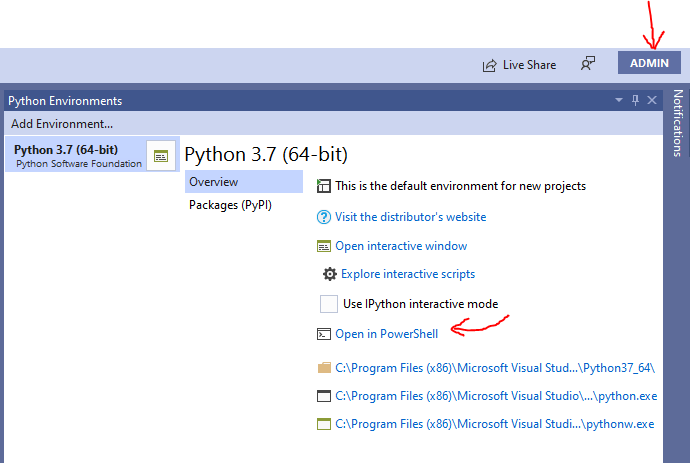
I guess not so many people use Visual Studio doing NLP with Python. I have been searching for a solution on how to add a Spacy module in Visual Studio. I kept getting cannot find en_core_web_sm module error and the only solution I could find is to run python -m spacy download en_core_web_sm. I was struggling to find where in the UI to run the Python command. And finally, the solution came.

you noticed the "Admin" icon? yes, that is the key to solve the problem. With admin permission, you can open PowerShell and run python -m spacy download en_core_web_sm.

I installed en_core_web_sm, but it shows a warning message. And the en_core_web_lg module can eliminate the warning.


Tuesday, July 29, 2014

SelfNote: Credit Risk Model

My first paper on Credit Risk model.

www.fonsrisksolutions.com/Documents/Using%20Default%20Rates%20FAJ.pdf is a good good paper. The unusual pattern "crisis-at-maturity" model is quite interesting to me.

Sunday, March 2, 2014

Setup Azure cloud on Windows Server

Service Bus is Azure Cloud solution, but it can be installed on your own hardware which must run Windows Server 2012.

Here are the links I think you need:
Installations and configuration instructions: http://msdn.microsoft.com/en-us/library/dn441394.aspx

the WebPI folder download folder is %LocalAppData%\Microsoft\Web Platform Installer\installers. You can get the WebPI installation file there.

the service bus connection string can be retrieved by using Get-SBClientConfiguration. Please make sure you import the certificate from the server to your local computer. Make sure use Get-SBAuthorizationRule to get the connection string with shared key.

Tuesday, May 28, 2013

SelfNote: ListBox scroll bar size

 <ScrollViewer.Resources>  
                                        <sys:Double x:Key="{x:Static SystemParameters.VerticalScrollBarWidthKey}">5</sys:Double>  
                                              <sys:Double x:Key="{x:Static SystemParameters.VerticalScrollBarButtonHeightKey}">5</sys:Double>  
                                              <sys:Double x:Key="{x:Static SystemParameters.HorizontalScrollBarHeightKey}">5</sys:Double>  
                                              <sys:Double x:Key="{x:Static SystemParameters.HorizontalScrollBarButtonWidthKey}">3</sys:Double>  
                                      </ScrollViewer.Resources>  

Sunday, March 3, 2013

SelfNote: PowerShell on SQL Jobs

You know what. The lack of "Start" button on Win8 makes me really learn PowerShell. I feel I am more like a Unix admin than an average user. :-D

 # disable backup job on a server  
 function Disable-BackupJob($serverName)  
 {  
   invoke-command -computerName $serverName -ScriptBlock { `  
     param($serverName); `  
     [System.Reflection.Assembly]::LoadWithPartialName("Microsoft.SqlServer.SMO") | Out-Null; `  
     $srv = New-Object Microsoft.SqlServer.Management.SMO.Server($serverName); `  
     $jobs = $srv.JobServer.Jobs | Where-Object {$_.IsEnabled -eq $TRUE} | Where-Object { $_.Name -like '*backup*' }; `  
     foreach ($job in $jobs) `  
     { `  
       write-host "$serverName.$job is to FALSE"; `  
       $job.IsEnabled = $false; `  
       $jobs.Alter(); `  
     }; `  
     $jobs = $srv.JobServer.Jobs | Where-Object {$_.IsEnabled -eq $TRUE} | Where-Object { $_.Name -like '*backup*' }; `  
     if ($jobs.Count -eq 0) { write-host "$serverName Done." } else { write-host "$serverName failed!" }; `  
   }`  
   -ArgumentList $serverName  
 }  

Saturday, March 2, 2013

SelfNote: PowerShell scripts

the following three functions are use PowerShell to set password, move cluster, and test connection to a database server.

 #set account username and password  
 function Set-Password($computerName, $serviceName, $serviceAccount, $password)  
 {    
   invoke-command -computerName $computerName -ScriptBlock `  
   { param($computerName, $serviceName, $serviceAccount, $password); `  
     write-host "on computer " $env:ComputerName "working on " $serviceName; `  
     $filter = "Name='" + $serviceName + "' "; `  
     $sqlservice=Get-WMIObject win32_service -filter $filter;`  
     $result = $sqlservice.change($null,$null,$null,$null,$null,$null, $serviceaccount,$password,$null,$null,$null);`  
     if ($result.ReturnValue -eq 0) { write-host $computerName " done!"; } else { write-host $computerName " failed!"; } `  
   } `  
   -ArgumentList $computerName,$serviceName,$serviceAccount,$password `  
 }  
 # move cluster  
 function Move-Cluster($computerName)  
 {  
   invoke-command -computerName $computerName -ScriptBlock `  
   { `  
     import-module failoverclusters;`  
     $result = Move-ClusterGroup sqlgroup;`  
     write-host "owner node = " $result.OwnerNode; `  
     $result = Move-ClusterGroup sqlgroup;`  
     write-host "owner node = " $result.OwnerNode; `  
   }  
 }  
 #test connection  
 function Test-Connection($servername)  
 {  
   $SqlConnection = New-Object System.Data.SqlClient.SqlConnection;  
   $SqlConnection.ConnectionString = "Server=$servername;Database=master;Integrated Security=True";  
   try  
   {  
     $SqlConnection.Open();  
     write-host "$servername connection OK."      
   }  
   catch  
   {  
     write-host "$servername connection failed"  
     write-host $error[0]  
   }  
   finally  
   {  
     $SqlConnection.Close();  
   }  
 }  

Tuesday, January 22, 2013

SelfNote: Convert rendered location to actual value

Learn something new everyday. :-)

Today I got a solution to get the rendered location for an object which has be RenderTransform-ed.

The trick is to use MatrixConverter to perform the conversion.