Pages

Showing posts with label XNA. Show all posts

Thursday, September 13, 2018

SelfNote: WebAssembly With Blazor & .NET Core Upgrade

After set up the HTML5/Typescript roadmap for my group, I started to move my interest to other UI/visualization technology. With the Blazor is in the starting phase, I feel this is an opportunity to get real-time web rendering and .net core in one shoot. The get start part in Blazor is very helpful. Only one small bug for the project creation if you upgrade .NET core.

From PowerShell window, you can find the .Net core version by using "dotnet --info". The Blazor service generates the global.json file, which sits beside the solution file. This file is required to load the .Net core. The default value in the file is 2.1.300. 

{
  "sdk": {
    "version": "2.1.300"
  }
}
My computer is new and I directly installed 2.1.402 version. Now I got the error complains about "cannot import package". After change that version to 402, I can now manually add those created projects (Blazor Server and Client) to the solution.  

Thursday, March 15, 2012

F# on Windows Phone - Graphic Calculator

During the recent Seattle F# Meetup, I was asked how to do the windows phone calculator with F#. It is not hard provided you know F#.

The backbone of the calculator is a string parser. It can be written from scratch or use existing one. Since I want to get it into production and not prepare for an interview, I choose to use the existing yacc parser provided by F# powerpack. If I hook the back-end yacc parser with the front-end, the majority of the work is accomplished, the rest is to brush your yacc/lex knowledge. I choose use the C# XNA as front-end because I want to draw the function diagram later and am afraid Silverlight won't meet my requirement. You can use F# XNA as front-end, but this is not the main topic.

The whole solution has 4 projects. Two of them are XNA standard projects and two of them are F# ones. The  Calculator folder contains the yacc/lex file. I use the F# Parsed Language Starter to create the project. This project is for desktop application, you have to modify the project file by adding the  the import elements:
  
And XNA project settings:


The most important is to make sure the project references the FSharp.Core.dll for Windows Phone.
They are located under the "Dependencies" folder.
If you go to WindowsPhoneCalculator project and find the following line in the Game.cs
    var r = Calculator.readAndProcess("1+3*2");

if you stop at that line, the r is 7. The full code is here.


Monday, October 10, 2011

F# doing WP7 app - Some Games


All WP7 by F# can be found at:


There are some basic games done by F# to explore how to use F# and XNA.

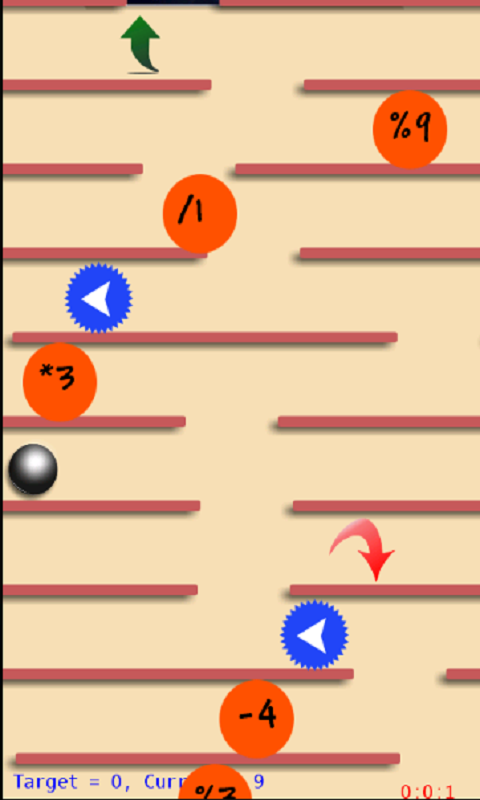
  • Crazy Falling Ball 2
Description:

Crazy Falling Ball 2 is the completely upgraded version of the well beloved crazy falling ball. 

1. Improved control. Easier and more responsive. 
2. More relistic physics.
3. Additional barriers forcing the ball to jump up, down, left and right, making it more challenging and fun!
4. Score Ranking section to record your best performance on each of the seven levels. 
5. add prize mode: to get more prize score
6. add math mode: try to control the ball to make the aggregation value to be 0
Tilt the phone to guide the ball through fast moving barriers moving upward.  Seven levels from piece of cake to impossibly tough. See how quick you can move the ball to the bottom and give your boring day a boost!

  • Prix ball game is just another version of Crazy falling ball.
  • Labyrinth
Classic labyrinth game where you control the ball while avoiding holes and traps to reach the destination.

Currently there is only one level supported.


F# doing WP7 app - Graphic calculator

All WP7 by F# can be found at:


The reason I choose F# as my major programming for WP7 application is because

  • F# is .net based language
  • F# requires less code when program the same feature. 
  • F# library and community provides large number of good algorithms, some of them are exotic and never heard of. But over all, that give me confident that I can have more stuff to show on a phone.
  • my previous experience shows F# generate less bugs. 


Many people as what is some real world app using F#? Here are some Windows Phone 7 app by F#. This app is XNA based. There are some app's, such as games, silverlight based application and games and tools

Calculator Pro is a professional calculator. More than 150 functions are supported. It supports:
  1. 50+ math operations, including advanced trigonometric functions, logarithmic functions, and eight variable storage spaces. 
  2. Programmer calculation, hex and oct calculation, bitwise calculation (including AND, OR, XOR), and float to/from int conversion. 
  3. Unit conversion, convert well known US units to metric units. 
  4. Function diagram: use your fingers to change range and understand how the function looks like in an easier way.
  5. Canada income tax calculation
  6. Tip calculation: support sale tax, number of person, round tip, and total display to make your tip calculation much easier.
  7. Statistics functions: stddev, average, Pearson correlation, Spearman correlation, normal distribution, skew, kurt.
  8. Quadratic equation: solve the Quadratic function, proivde you delta (discriminant), x1, and x2. solution can be in imaginary number format.
  9. Mortgage and loan: given term, interest rate, down payment, tax per year, fee per month, and loan amount and get the monthly payment.
  10. Currency conversion feature which enable you to get latest currency rate from Yahoo. By click the "To ANSW" button, you can link the rate with other calculation easily.
  11. Money value mode: get present value and/or future value by giving interest, payment, growth rate and period.
  12. Email funtion: email your last calculation result and merge to your document. You can keep track your tip, and unit conversion, and other computation.
  13. SMS function: SMS your last calculation result when do not have data access.

You got 11 calculation functions within one single app!