Pages

Wednesday, June 13, 2012

Snippet file updated

Thanks for the review and feedback, the snippet file is updated according to the feedback. We will keep updating these snippets. The snippet file will be updated on the blog.

currently the snippets are from two sources:

  1. the snippets generate the basic F# structures, such as for, while, if, etc
  2. convert C# snippets to F#.
We try to control the snippet with shortcuts minimum and meanwhile continue to contribute to the one without shortcut.


If you are using code snippets and have some suggestion on some new snippets you like or dislike.  Please let us know.


How to write your F# snippet

If you are going to write your own F# code snippet to work with the F# snippet add-on, it is pretty simple. The snippet file format is exactly like the C# snippet file except the language tag is "fsharp". Please note the F# snippet support "add reference". If you copy the existing C# snippet, be careful about the reference part. You do not want to insert a F# tuple and suddenly have Windows.Form.dll inserted into the reference. (I have to confess, I did this several times after copying C# ones. :-( )

This tag is also used to distinguish F# snippet and C# snippet when insert into the database.


Please feel free to setup your snippet database using the script.


F# snippet files v0.8 are here!

along with the published F# code snippet addon for Visual Studio 2012 RC, F# Shanghai team also provides a set of snippets. we have already moved them to open source project on codeplex.


are contributors this package.

you need to copy them to the " C:\Users\ < user name > \Documents\Visual Studio 2012\Code Snippets\Visual F#\My Code Snippets" after you successfully install the snippet addon. Please also check your code snippet manager to make sure fsharp does point to the Visual Studio 2012\Code Snippets folder. Some computers still points to Visual Studio 11\Code Snippets folder.

If you find anything odd, please either shoot me message on twitter (ttliu2000) or fsbugs@microsoft.com


Tuesday, June 12, 2012

Generic Invoke function for Type provider with get / set features

A customer is using the SQL type provider access different databases. He then want to write an general function to access these types. It is not easy to give an interface to the generated types. So he resort to some generic methods, so can save his coding effort. What he want a function can get and set the value of a property on the parameter. The parameter might have different types because they are from different data source, but all of them have the same proeprty/method.

If you still remember the GI function, which makes cat and dog walk together, in my Channel 9 video. You can apply the GI function here.

The following is the sample code. (delete extra space if the code cannot compile)


let inline get2< ^a when ^a : (member get_Name  : unit -> string ) and
                                 ^a : (member setValue : string * string -> unit)>
 xItem =
  let name =  (^a : (member get_Name  : unit -> string ) xItem)
  let value = (^a : (member setValue : string * string -> unit) (xItem, "123_2", "123_2" ))
  name, value

// pretend this is the type from type provider
type MyClass() = class
    member val Name = "" with get, set
    member public this.setValue(str0:string, str1:string) = this.Name <- sprintf "%s, %s" str0 str1
end

// pretend this is the type from type provider
type MyClass2() = class
    member val Name = "" with get, set
    member public this.setValue(str0:string, str1:string) = this.Name <- sprintf "%s, %s" str0 str1
end

[< EntryPoint >]
let main argv =

    let a0 = MyClass()
    let a1 = MyClass2()

    get(a0)
    get2(a1)

    printfn "%s" a0.Name   // the value is "123, 123"
    printfn "%s" a1.Name   // the value is "123_2, 123_2"
 
    printfn "%A" argv
    0 // return an integer exit code

F# code snippet + snippet management for Visual Studio 2012 Addon

If you ever use the C# code snippet feature, you will love how it works. When you cannot memorize the syntax or some commonly used code patterns, the little snippet will be your assistance. I decide to use my weekend time to get this working. Our Shanghai team helps us provides about 70 snippets covering basic syntax, query, type provider, cloud, etc. Shanghai team will continue contribute to the public storage. The setup file is available here.

Setup steps
  1. close Visual Studio 2012.
  2. copy the setup zip to your local computer and unzip it
  3. find your Visual Studio 2012 installation path and create folder structure like the following one:
    "C:\Program Files\Microsoft Visual Studio 11.0\FSharp\Snippets\1033\SnippetsIndex.xml"

    Note: if you are not running English version (1033), you need to find the language ID from C# folder.
  4. Run the package file, which can also be found at VS Gallery.
  5. after you go into visual studio, you can perform your first download.
if you decide NOT to sync up with our F# snippet hosted on cloud, skip next section.

Sync up on Cloud (Expired)
This feature is retired, please use the local installation. 


Install Locally
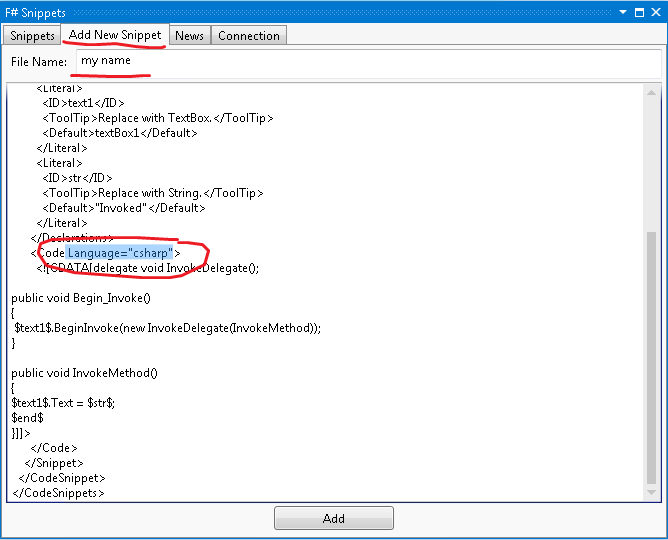
If you decide NOT to sync up with cloud F# snippet. You can download the snippet from the codeplex project. Those snippet files need to be under My Document. You can find the specific path from Code Snippet Manager. See the screen shot below. This post is also specified how to get the snippet to your local computer.


Add your snippet
If you have a common use snippet want to share in your department, you need setup your SQL server. The setup script is here. The SQL script will make sure the database setup is recognizable to the snippet binary running inside your Visual Studio 2012. Most likely you will log in to your private storage using "sa" login information. If that is the case, you will see another tab "Add Snippet".  Since the XML file has a language attribute, you can let the program know it is a C# or F# snippet. When you later on download it, it will be insert into different snippet folder.


Add Reference Feature

In addition to C#'s snippet feature, I enable F# snippet to add reference in the F# project. See the screenshot for adding a type provider. It add several DLL's as reference. you can use Ctrl+K,X to bring up the whole list of F# snippets. Some snippets have shortcut and they will show when you type, e.g. class. With many new features put into F# 3.0, I was hoping the code snippet feature can actually help you to write new syntax and further improve your productivity.


The old snippet management has a drawback which cannot be updated easily and is not easy to share the snippet among your colleagues. This snippet tool tries to address these problems by using both a public cloud storage and a private SQL storage.

Sync F# Snippet On Cloud
you need to shoot email to fsbugs@microsoft.com to get login information and unlock the IP address.


If you experience any bugs or need more snippet to help your daily programming work, please leave your comment, or use twitter(ttliu2000) to shoot me message, or use fsbugs@microsoft.com.

Uninstall
if you are going to uninstall it, you can go to Tools->Extension and Updates to uninstall it.


Saturday, June 9, 2012

SelfNote: inline is the way to get out of the generic error


if you ever have some error like:


This code is not sufficiently generic. The type variable  ^a when  ^a : not struct and  ^a : (new : unit ->   ^a) and  ^a : (member get_Value :  ^a -> string) and  ^a : (member set_Value :  ^a * string -> unit) could not be generalized because it would escape its scope.       


in the code:


let get_enum_obj<'a  when 'a : not struct
                     and  'a: (new : unit->'a)
                     and  'a: (member Value:string)
                     and  'a: (member Value:string with set)>  (db:Table<'a>) s =  

the magic word is to use "inline" in the function. 

Friday, June 1, 2012

F# function parameters

From the google search, it is easy to find how to handle C#'s out/ref parameter in F#. This post tries to summarize the out/ref parameter between F# and C#. Both from C# to F# and F# to C#.
  • F# invoke C#
the C# code defines the following method inside ConsoleApplication1.Program class.
        public void OutTo9(out int i)
        {
            i = 9;
        }

        public int OutTo8(out int i)
        {
            i = 8;
            return 1;
        }

        public void RefTo10(ref int i)
        {
            i = 10;
        }

the F# needs to invoke the above function like:

        let a = ConsoleApplication1.Program()
        let b = a.OutTo9()
        let (returnValue, outValue) = a.OutTo8()
        let c = ref 0;
        a.RefTo10(c)
  • C# invoke F#
We define the F# code like:

//please remove extra space around < and > if the code does not compile. The blog does not support the character.

type MyClass() = class
    member public this.OutTo8([< System.Runtime.InteropServices.Out >]outValue:byref) = 
        outValue < - 8
    member public this.RefTo4(args:byref< int >) = 
        args < - 4
end

In the C# code, you can see:

            var a = new MyClass();
            int b = 0;
            a.OutTo8(out b);
            Console.WriteLine(b);
            a.RefTo4(ref b);